When you go shopping for a new monitor, the monitor panel types are one of the most important things to look at. Yet most people ignore it completely and just focus on screen size or price. That is a mistake. The panel type decides how your colours look, how fast the screen responds, how wide you can view it from, and how deep the blacks appear on screen.
The panel type decides how your colors look, how fast the screen responds, how wide you can view it from, and how deep the blacks appear on screen. Choosing the wrong one is a mistake.
summary
Monitor panel type dictates colour accuracy, speed, contrast, and viewing angles. TN offers raw speed for esports; VA delivers deep contrast for movies; IPS provides colour-accurate perfection for creators; and OLED brings ultimate, premium visual quality at a higher cost.
Table of Contents
So before spending your money, take a few minutes to understand what each panel type actually offers. There are four main ones you will come across — TN, VA, IPS, and OLED. Each has a different purpose, a different price range, and a different set of strengths and weaknesses. Let’s go through all of them.
1. TN (Twisted Nematic) Panels
TN is the oldest panel type still being sold today. It uses LCD technology that bends to allow light through, and because of its simple design, TN panels are cheaper to make and often the first to see progress as faster refresh rates become available.
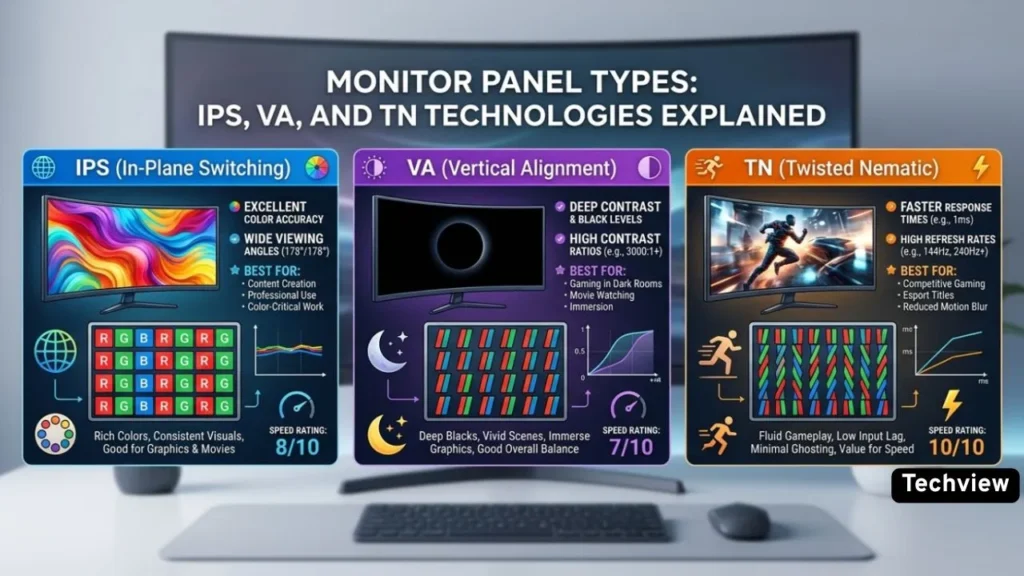
The one area where TN panels still lead is raw speed. TN panels achieve response times as low as 0.5ms — faster than any IPS or VA equivalent — and support refresh rates of 360Hz and beyond. This is why competitive esports players have always preferred TN. In games where every millisecond counts, this speed gives a real advantage.
But the speed comes with clear trade-offs. TN panels have the highest refresh rates and fastest response times, but have inferior image quality and viewing angles. Colors on TN screens look washed out, especially when you move even slightly to the side. If you are sitting dead-center, things look decent. But the moment you tilt the screen or sit at an angle, the image quality drops noticeably.
In 2026, TN’s dominance in competitive gaming has eroded significantly. Fast IPS technology has closed the response time gap to under 1ms, making TN’s speed advantage much narrower than it once was.
Best for: Budget builds, competitive esports gaming, office setups where color accuracy does not matter.
Not ideal for: Photo editing, design work, movie watching, or anything that requires good color.
2. VA (Vertical Alignment) Panels
VA panels sit right in the middle of the pack. They are not as fast as TN and not as color-accurate as IPS, but they bring something both of those panels lack — excellent contrast.
VA panels routinely hit contrast ratios of 3,000:1 to 6,000:1 — producing visibly deeper blacks and richer shadow detail. For comparison, TN and IPS panels typically sit around 1,000:1. That is a massive difference, and you will notice it immediately when watching movies or playing atmospheric single-player games where dark scenes matter.
VA panels feature the highest contrast ratio of the three basic backlit panel types, only beaten by the near-infinite range on OLEDs. These deep blacks help with HDR content, making VA the most popular choice for LED TVs.
The main weakness of VA panels is their response time in certain transitions. VA comes with slower black-to-white pixel transitions despite a similar 5ms grey-to-grey response as other models. This can cause a smearing or ghosting effect in fast-moving scenes, which makes VA a less ideal choice for competitive gaming.
Viewing angles on VA are better than TN but not as wide as IPS. Thanks to their high contrast and lack of IPS glow, VA panel displays are particularly great for watching movies in a dark room where details in the shadows really stand out, which is why most LED TVs use VA panels, not IPS.
Best for: Movie watching, single-player games, general everyday use, people who want deep blacks without paying OLED prices.
Not ideal for: Competitive fast-paced gaming or professional color work.
3. IPS (In-Plane Switching) Panels
IPS is the most popular panel type for a reason. It hits a solid balance between color performance, viewing angles, and speed — making it a reliable choice for almost anyone.
In-plane switching monitors have garnered a lot of acclaim for their color performance. They’re the only variety that regularly provides 95% or even 100% of DCI-P3, the widest color gamut currently formalized and the one used in digital cinema.
The viewing angle advantage is significant for IPS. IPS nails color accuracy and consistency with viewing angles that are often better than other technologies, providing visibility from as wide as 178 degrees. This is perfect for video calls, co-reviewing documents, and juggling windows across a dual-display desk.
IPS is the go-to choice for designers, photographers, and video editors for this exact reason. When you are editing a photo or grading a video, the colors need to look accurate no matter where you are sitting. IPS delivers that reliability.
Speed is also no longer a weak point. Fast IPS has taken over the role TN used to own, with modern IPS monitors now hitting response times under 1ms — good enough for gaming too.
The two main downsides of IPS are its contrast ratio and a phenomenon called IPS glow. The usual complaint with IPS is IPS glow. In a dark room, black content can look slightly gray or milky near the corners. Contrast is also usually weaker than VA, so movies and dark games do not look as rich.
Price is another factor. IPS monitors cost more than TN and VA, though prices have come down significantly in recent years.
Best for: Designers, photographers, video editors, office workers, general-purpose users, gamers who value image quality.
Not ideal for: People on a tight budget or those who watch a lot of dark content in low-light rooms.
4. OLED Panels
OLED is a completely different technology compared to the three above. The main difference with OLEDs is that each pixel emits its own light, allowing for one part of the screen to be bright white while the adjacent pixels are not even on, resulting in a deep and pure black. There is no backlight involved. Every pixel controls its own brightness.
The result is outstanding. The main advantages of OLED in gaming are infinite contrast and by far the fastest response times, even faster than TN. You get as close to 0ms response with OLED as the laws of physics allow. Image quality and viewing angles on OLED are excellent, with really deep black levels.
OLED monitors also look stunning for media consumption. Colors are vivid, blacks are pure, and the overall image has a depth that LCD panels simply cannot match.
However, OLED comes with some concerns. Burn-in is the big one. Without a backlight, OLED suffers from a risk of burn-in, where an on-screen visual lingers long after it’s gone. This is especially concerning with static user interface elements, like the Windows Taskbar or floating heads-up displays in games. Manufacturers have added OLED care features to reduce this risk, but it still requires some attention.
Brightness is another issue. OLEDs aren’t as bright as VA panels in some scenarios. Mainstream IPS and VA panels usually have peak brightness levels between 250 and 400 nits, while OLED panels feature significantly higher peak brightness at around 1000 nits — but they cost much more than other models. XDA Developers
And of course, price. OLED monitors are the most expensive on the market.
A newer version called QD-OLED (Quantum Dot OLED) is also gaining popularity. QD-OLED combines OLED’s perfect blacks with quantum dot color enhancement for higher peak brightness and wider color coverage than standard WOLED panels. Newegg Insider
Best for: Premium gaming, professional content creation, movie watching, anyone who wants the absolute best image quality.
Not ideal for: Budget shoppers, users who keep the same static elements on screen all day long.
5. Mini LED — A Bonus Worth Knowing
Mini LED is not a panel type on its own. It is an advanced backlighting technology often paired with LCD (usually IPS or VA). Using thousands of tiny LEDs between 50 and 100 times smaller than regular ones, it creates local dimming zones for more precise lighting control. Think of it as a significant upgrade to regular LCD monitors that brings contrast closer to OLED without the burn-in risk. The downside is that it costs more and can sometimes produce a slight halo effect around bright objects on dark backgrounds.
Quick Comparison at a Glance
| Feature | TN | IPS | VA | OLED |
| Speed | Very fast | Fast | Medium | Fastest |
| Color Accuracy | Weak | Excellent | Good | Excellent |
| Contrast | Low | Low-Medium | High | Best |
| Viewing Angles | Narrow | Wide (178°) | Medium | Wide |
| Price | Lowest | Mid | Mid | Highest |
| Best Use | Esports gaming | Creative work / Office | Movies / Casual | Premium all-round |
Which Panel Type Should You Pick?
The answer depends on what you actually do with your monitor.
If you are a graphic designer, photographer, or video editor, go with IPS. Color accuracy matters most in your work, and IPS delivers it reliably.
If you mostly watch movies and play story-driven games, VA is a solid choice. Those deep blacks and high contrast make dark scenes look fantastic.
If you are a competitive gamer on a tight budget, TN still has a place. It is fast, cheap, and gets the job done.
If you want the best possible visual experience and have the budget for it, OLED is hard to beat. Just be mindful of burn-in if you do a lot of static work.
For most everyday users, IPS is the safest and most sensible choice. It does everything well without forcing you into a major compromise.
Which monitor panel type is best for gaming?
It depends on your gaming style. TN panels offer the fastest response times (up to 0.5ms) and highest refresh rates, making them ideal for competitive esports. However, OLED panels provide the ultimate premium gaming experience with infinite contrast and near-instant response times, while Fast IPS panels offer the best overall balance of speed and vibrant colors.
What are the main disadvantages of an IPS panel?
The two primary downsides of an IPS panel are its lower contrast ratio (typically 1,000:1 compared to VA’s 3,000:1+) and a phenomenon known as IPS glow, where black content looks slightly gray or milky near the screen corners in dark rooms. They are also generally more expensive than TN and VA panels.
Should I buy a VA or IPS panel for watching movies?
A VA panel is significantly better for watching movies, especially in low-light environments. VA panels deliver high contrast ratios (3,000:1 to 6,000:1), resulting in deeper blacks and richer shadow details. IPS panels suffer from weaker contrast and IPS glow, making dark movie scenes look slightly washed out.